Taskbar Express FR Coming soon

A real train crosses your taskbar, on time.

Taskbar Express draws a pixel-art train along the bottom of your screen, at the time of the real departures from the station you pick.

Windows · coming soon Premium · $5 · coming soon

Free version included · One payment, no subscription

  • 7rail networks
  • 183stations with real departures
  • 0%CPU between two trains
  • Luato write your own mods

How it works

Pick a station. The train does the rest.

  1. 01

    Choose your station

    Search Paris Gare de Lyon, Montréal, Chicago Union Station or Berlin Hbf. Your station and its timetable are saved.

  2. 02

    A train leaves at each departure

    When a real train departs, a pixel-art train crosses your screen. Between two departures, nothing runs.

  3. 03

    Make it yours

    Pick the scenery, the speed, the sound, the night look. Or drop in a mod and change everything.

Features

Made by train lovers, for the desktop.

One small program, drawn by its own renderer. No video, no web page: real pixels, laid on your desktop.

Real timetables, from real stations

Departures come from the public data of six operators, plus the Shinkansen, refreshed every night. Your train leaves when the real one does. Live delays are not supported yet.

  • SNCF · France
  • VIA Rail · Canada
  • Amtrak · USA
  • Deutsche Bahn · Germany
  • Renfe · Spain
  • Toei · Tokyo
  • Shinkansen · Japan

The right train for each departure

A TGV for a TGV, a regional for a regional, a freight for a freight. The train that crosses is chosen to match.

Night, with real light

From 7 pm, windows light up, headlights cast a beam and the ballast glows. The desktop is never darkened.

A Shinkansen at night with lit windows, in front of a Japanese city

Scenery and weather

Countryside with overhead wires, falling snow, drifting autumn leaves. Each terrain is a mod you can swap in a click.

The Glacier Express and its panoramic cars crossing a snowy pixel-art countryside

Mods in JSON and Lua

Trains, containers, terrain and fonts are folders of JSON and PNG. Behaviour is written in Lua and reloads as soon as you save. Scripts can't touch your files or the internet. This is the whole day-and-night cycle:

-- Night from 7 pm to 7 am, PC time.
local EVENING, MORNING = 19, 7

local function update(h)
  rail.set_night(h >= EVENING or h < MORNING)
end

function on_load() update(rail.state().hour) end
function on_hour(h) update(h) end


Your station, in one window.

Pick a station, a train and a scenery, then close the window. The train keeps running behind your apps, at the time of the real departures.

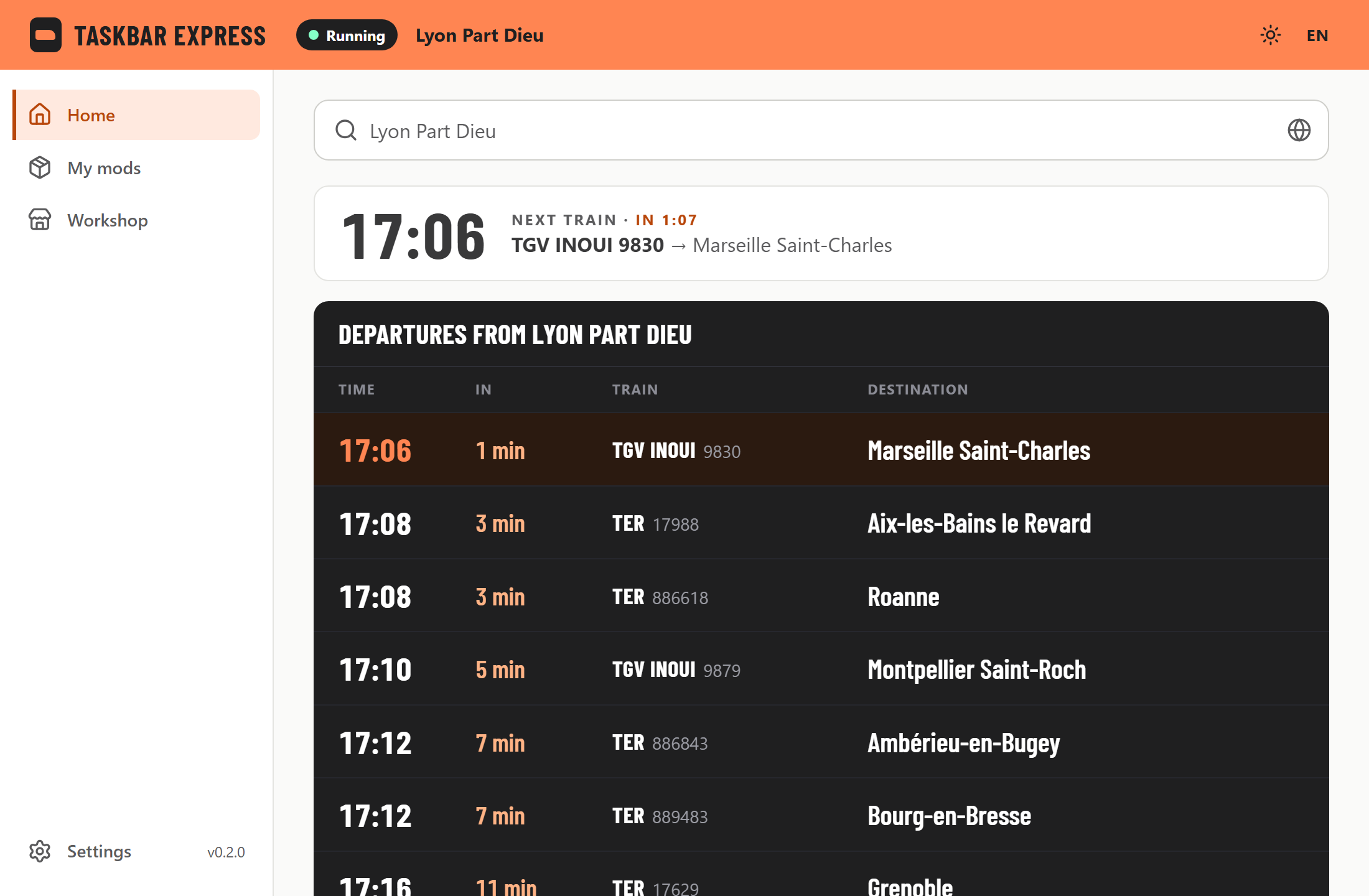
Taskbar Express home: departure board of Lyon Part-Dieu and the next pass
The board of your station, and the next train that will cross your screen.
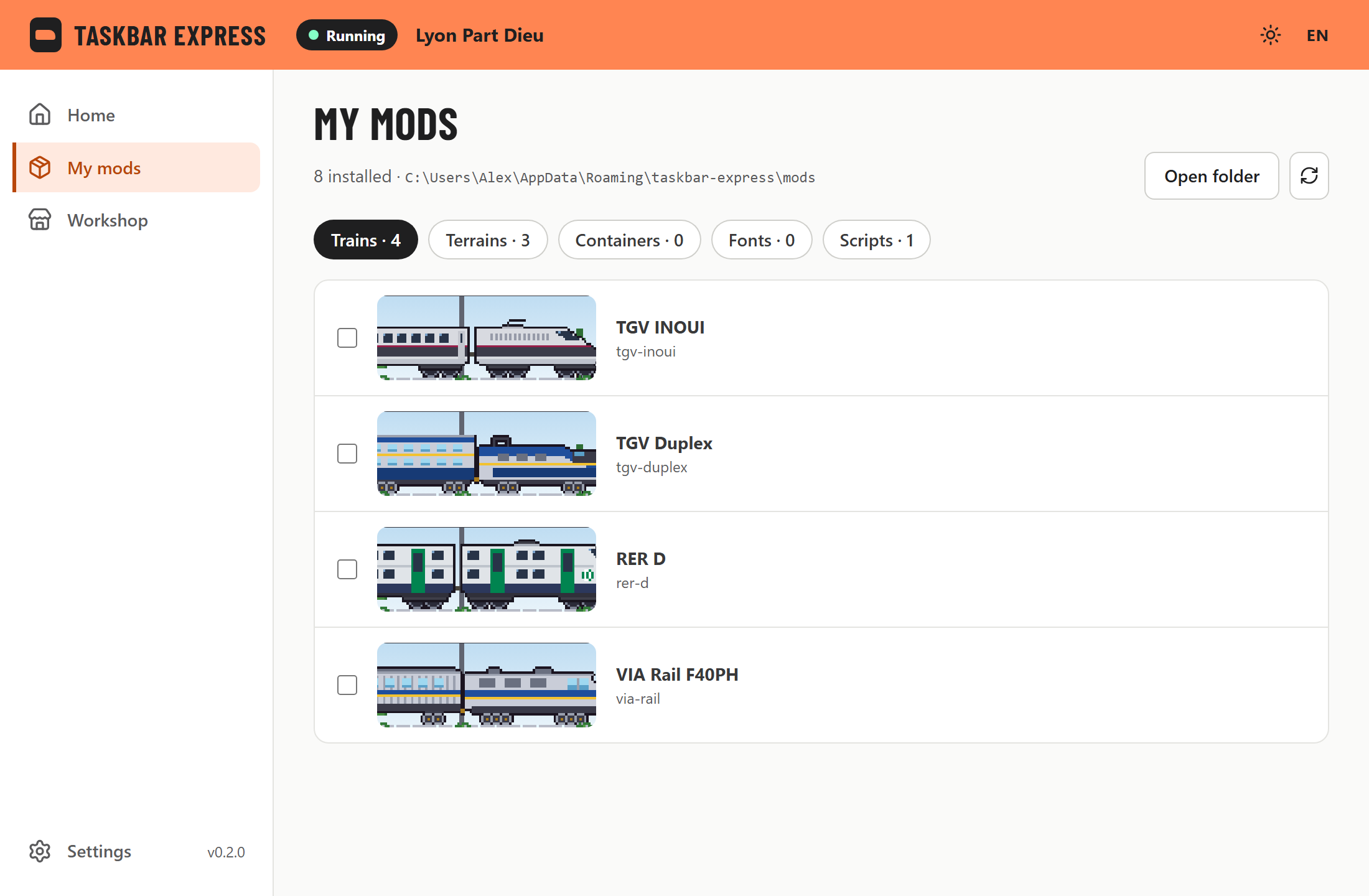
My mods screen listing the installed trains with their pixel-art previews
Every train, terrain and script you installed, previewed by the renderer itself.

Pricing

Try it free. Buy it once.

The free version runs forever. Premium unlocks real timetables, the right train for each departure and the Workshop, for a single payment.

Free

$0

  • One train every 30 minutes
  • Every train in your mods folder
  • Terrains, sounds and your own mods only
  • No real timetables
Windows · coming soon
Premium

$5one-time

  • The real timetable of your station
  • The right train, picked to match each departure
  • Any frequency, as often as you want
  • Workshop access
Premium · $5 · coming soon

No subscription. Payment and licence key handled by Lemon Squeezy.

Workshop · coming soon

Share your trains with everyone.

Today a mod is a folder you drop into mods/. The Workshop will let you browse, install and publish mods from the app, without an account to publish. Included in Premium.

  • TrainsSprites, wheels, lights, sounds
  • TerrainsTracks, scenery, weather
  • ContainersLoads for freight wagons
  • FontsPixel fonts for on-screen text
  • ScriptsLua: events, menus, lights

FAQ

Good to know.

Which versions of Windows does it run on?

Windows 10 and Windows 11. A macOS version is planned for later.

Does it slow my PC down?

Between two trains the program sleeps at 0% CPU. It only wakes up to draw a train crossing the screen.

Will the train cover my windows or my games?

No. It sits just above the desktop, under all your windows, and hides itself on a screen where a window is maximised or full screen.

Which stations and countries are covered?
NetworkCountry
SNCF VoyageursFrance
VIA RailCanada
AmtrakUSA
Deutsche Bahn, long-distanceGermany
Renfe, high-speed and long-distanceSpain
Toei subwayTokyo, Japan
Shinkansen (typical timetable)Japan
What do I get with Premium?

Real timetables from your station, the right train picked to match each departure, any frequency and Workshop access. One payment of $5, no subscription.

Can I make my own trains and scenery?

Yes. A mod is a folder: JSON describes trains, containers, terrain and fonts, and Lua scripts drive the behaviour. Scripts can't touch your files or the internet. A Workshop to share mods is planned.

Is it affiliated with SNCF, VIA Rail, Amtrak, Deutsche Bahn, Renfe, Toei or JR?

No. Those names belong to their owners. Taskbar Express is an independent project; timetables come from the public data each operator publishes.

Your desktop is missing a train.

Start with the free version. Switch to Premium when you want your own station on the clock.

Windows · coming soon Premium · $5 · coming soon